> For the complete documentation index, see [llms.txt](https://help.wegic.ai/llms.txt). Markdown versions of documentation pages are available by appending `.md` to page URLs; this page is available as [Markdown](https://help.wegic.ai/change-log/whats-new.md).
# What's New?
## 04/20/2026
{% stepper %}
{% step %}
### ☁️ Wegic Cloud
We’ve launched Wegic Cloud, a built-in system that adds data storage and form capabilities to your website.
With it, your site can now collect real user data like contact forms, bookings, and custom requests, while Kimmy automatically handles all database setup and connections for you.
It can also provide a simple admin dashboard to view and manage all submissions.
[Learn more→](/features/wegic-cloud.md)
{% endstep %}
{% endstepper %}
## 03/25/2026
{% stepper %}
{% step %}
### 🔍 Site Audit & Optimize
Your website might look great — but now Wegic can also help make sure it performs great.
Site Audit & Optimize scans your website for issues related to SEO, performance, mobile experience, accessibility, and content quality, then helps improve parts of your site automatically with AI — directly inside the editor.
[Learn more→](/seo-optimization/site-audit-and-optimize.md)
{% endstep %}
{% endstepper %}
## 02/05/2026
{% stepper %}
{% step %}
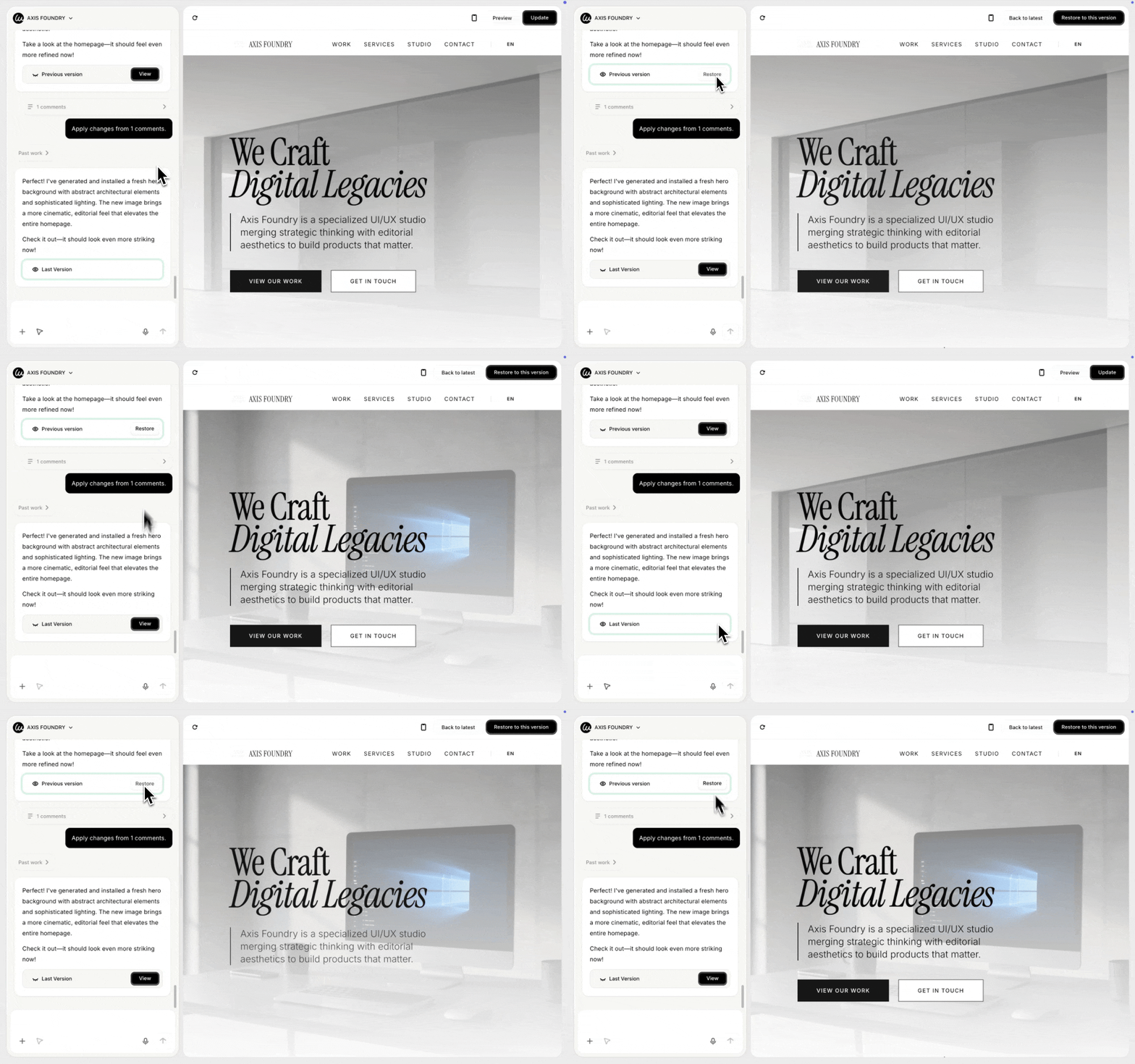
### ⏎ Restore Previous Versions
Wegic users can now preview and restore earlier versions of their website at any time.
This helps you safely undo changes, compare different results, and experiment freely without losing your work.
[Learn more →](/tips-and-tricks/restore-version.md)
{% endstep %}
{% endstepper %}
## 02/03/2026
{% stepper %}
{% step %}
### 🔮 Extra Credits for Premium Users
Premium users can now purchase extra credits anytime when monthly credits are not enough.
Extra credits are added instantly and can be used right away.
[Learn more→](https://help.wegic.ai/welcome-to-wegic/plan-and-credits#buying-extra-credits-premium-only)
{% endstep %}
{% endstepper %}
## 01/27/2026
{% stepper %}
{% step %}
### ⬇️ Download Website Code
You can now download your website code by asking the AI to package the latest version for you.
This feature is available to subscribed users and uses credits for each download, since the AI checks and packages your code every time.
It helps you keep a local copy, move your site elsewhere, or continue development outside Wegic.
[Learn more →](/features/download-code.md)
{% endstep %}
{% endstepper %}
## 01/20/2026
{% stepper %}
{% step %}
### 🔮 Wegic Credit Billing Policy Update
**Billing Optimization:** Credits are now calculated precisely based on actual token usage.
**Error Resolution Guarantee:** If a task fails due to a Wegic issue, no credits will be deducted for fixes.
**Transparent Tracking:** View detailed credit usage for all tasks anytime in the Usage Dashboard.
{% endstep %}
{% endstepper %}
## 01/08/2026
{% stepper %}
{% step %}
### 🎨 Better Conversations Before Website Generation
We’ve improved how the AI talks with you before building your website.
The AI now has more back-and-forth conversations to better understand your business, goals, and content. It also shows you a few style options, so you can confirm the look and feel before the website is built.
By using your real business information and your chosen style, the website is more complete and ready to use from the start. This helps reduce later edits and save time.
{% endstep %}
{% endstepper %}
## 01/06/2026
{% stepper %}
{% step %}
### 🎙Voice Input for Website Editing
We’ve added a new way to build and edit your website using your voice!
Now, in the editor, you can click the microphone 🎙 button or hold the Option (⌥) / Alt key to speak your instructions. The AI will convert your speech into text for you to send or edit before sending.
This feature saves you from typing long messages and makes editing faster and easier.
[Learn how to use Voice Input →](https://help.wegic.ai/features/use-voice-input#how-to-use-voice-input)
{% endstep %}
{% endstepper %}
## 12/22/2025
{% stepper %}
{% step %}
### 💬 Comment Mode for Easy Website Changes
You can now add comments right on your website preview to tell the AI what to change.
* Just click the arrow at the bottom left to enter Comment Mode.
* Then click on the part you want to fix and write your comment.
* When you’re done, send all comments at once.
* The AI will make the changes for you.
This helps you show exactly what needs to be changed and makes editing faster.
[Learn how to use Comment Mode →](https://your-help-center-link.com/comment-mode)
{% endstep %}
{% endstepper %}
## 12/01/2025
{% stepper %}
{% step %}
### 🚀 Powered by Gemini 3
Upgraded to Google's latest Gemini 3 model for superior design understanding
Enhanced natural language processing for more accurate intent recognition
Better industry-specific style selection and creative design decisions
Faster response times with improved context awareness
{% endstep %}
{% step %}
### ✨ Simpler Than Ever
Start with one sentence - AI proactively asks for details
No technical knowledge required - describe in plain language
Real-time preview - see changes as you chat
Easy modifications - "make it bigger", "change to blue", "add a product catalog"
Support reference image uploads for style inspiration
{% endstep %}
{% step %}
### 🎨 Stunning Visual Effects
Professional animations、Magazine-quality layouts、AI-generated visuals、Modern design system、Responsive design
{% endstep %}
{% endstepper %}